

What Is Acceptable Latency for Video Conferencing?
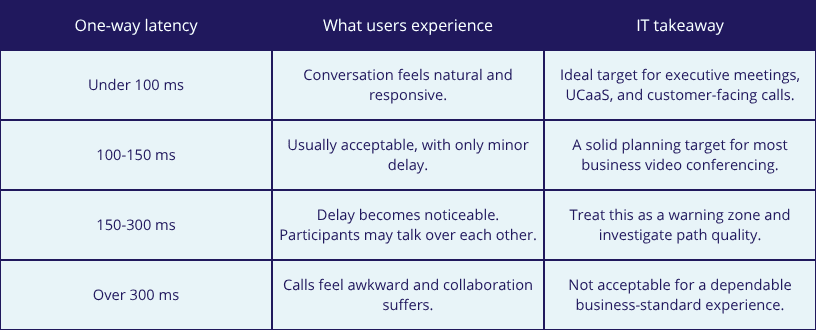
For most businesses video conferencing, acceptable one-way latency is under 150 milliseconds, and under 100 milliseconds is a better target when you want conversations to feel natural. Once latency climbs above that range, users start talking over each other, pauses feel awkward, and the meeting experience becomes noticeably less productive.
For IT leaders, that means the real goal is not just buying more bandwidth. It is designing a network that keeps latency, jitter, and packet loss consistently low for Zoom, Microsoft Teams, Webex, and other real-time collaboration tools.
Quick reference
Why latency matters more than most teams think
Bandwidth gets more attention because it is easy to compare on a quote or invoice. Latency is less obvious, but it has a bigger effect on how a live meeting feels. Video conferencing depends on rapid back-and-forth exchanges. Every time audio, video, screen sharing, or chat signals take too long to travel, the call becomes harder to follow.
- High latency creates delayed responses and people speaking over one another.
- Variable latency often shows up as choppy audio, frozen video, or screen-share lag.
- Even when average bandwidth is fine, poor path quality can still ruin the call experience.
That is why latency should be treated as an application-performance issue, not just a network-performance statistic.
What causes video conferencing latency?
If meetings feel delayed, the cause is usually somewhere between the user, the local network, the internet path, and the cloud platform itself. The most common contributors include:
- Congested shared internet circuits during peak usage times
- Too many routing hops between the user and the conferencing platform
- Weak Wi-Fi coverage or interference inside the office
- Oversubscribed firewalls, SD-WAN appliances, or security stacks
- Traffic competing with large backups, downloads, or cloud sync jobs
- Remote sites or temporary offices using less predictable last-mile connectivity
In other words, users may describe the issue as a bad call, but the underlying cause is often broader network design.
How IT leaders should evaluate call quality
A good troubleshooting process looks past internet speed tests. IT leaders should evaluate how the network behaves under real production conditions and focus on consistency, not just peak throughput.
- Measure one-way latency, jitter, and packet loss during actual meeting windows.
- Compare office, branch, and remote-user experiences separately.
- Check whether issues line up with backup windows, large file transfers, or other spikes in usage.
- Review whether cloud traffic is taking an efficient path or hairpinning through unnecessary locations.
- Identify whether the bottleneck is local Wi-Fi, the WAN edge, the last mile, or the carrier path.
This kind of analysis helps teams avoid the common mistake of upgrading bandwidth when the real problem is latency, jitter, or path instability.
What network design choices improve latency?
If video collaboration is business-critical, latency should be considered part of the network design brief. Several decisions can make a measurable difference:
- Use dedicated or higher-quality business connectivity instead of relying only on best-effort internet.
- Prioritize real-time traffic with QoS where appropriate.
- Reduce unnecessary backhaul and simplify the path to cloud collaboration platforms.
- Improve office Wi-Fi design for conference rooms and high-density collaboration areas.
- Add diversity or alternate last-mile options for sites where the primary connection is inconsistent.
- Monitor performance continuously so small issues are caught before users start opening tickets.
For many organizations, the real improvement comes from combining better connectivity with better visibility.
MHO has solutions that can help
MHO is well positioned when IT leaders need low-latency, business-grade connectivity for cloud and collaboration workloads. The practical value is not just more speed. It is a network path designed for predictable performance, fast installation, and resilience across locations where traditional options may be slow to deploy or hard to trust.
Suggested MHO links to help you learn more about latency
- Why latency matters for cloud applications: https://blog.mho.com/why-latency-matters-for-cloud-applications
- Reducing latency with an MPLS core network: https://blog.mho.com/reducing-latency-with-an-mpls-core-network
- How to choose the right service level agreement SLA: https://blog.mho.com/how-to-choose-the-right-service-level-agreement-sla
- MHO services overview: https://www.mho.com/services/
- MHO business internet and connectivity solutions: https://www.mho.com/solutions/
What can you do to improve latency?
If your teams depend on video conferencing and meetings still feel delayed, MHO can help you look past basic speed tests and evaluate the network conditions that actually shape call quality. Talk with MHO about low-latency connectivity, path diversity, and business internet options that support smoother collaboration across offices, remote teams, and cloud applications.



![[Infographic] Fixed Wireless: What You Need To Know](https://blog.mho.com/wp-content/uploads/2017/06/Screenshot-2025-06-24-141710.png)